Open-source CMS for Astro and Next.js
Polaris CMS
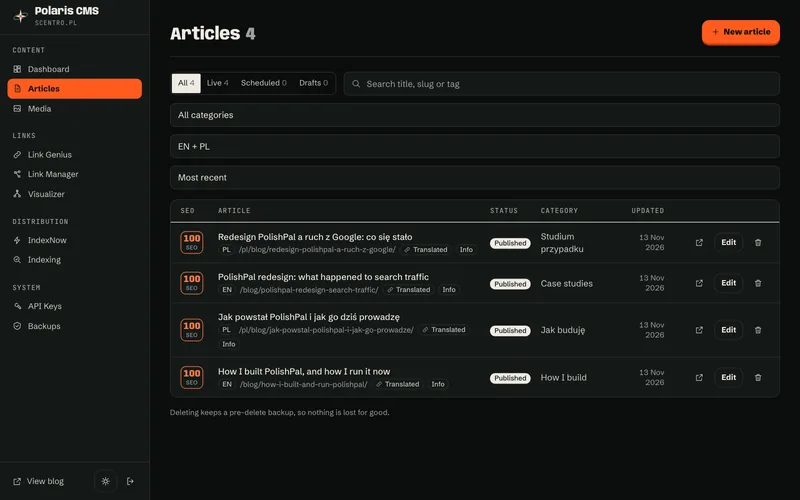
My own CMS, built into the site: write in two languages, see each post's SEO score as you type, schedule it, and let AI agents publish under the same rules.
Status Open source under the MIT license. The public release on GitHub and npm is in preparation.
In short
Polaris CMS is the content system I run my own sites on. It is not a hosted service: it lives inside the site's own Astro or Next.js app, keeps posts and images in the site's PostgreSQL database and adds an admin at /studio.
It started as the blog editor inside PolishPal, where it got its name. For the next sites I ported it to Astro and Next.js instead of picking a hosted CMS, and today it runs six sites: PolishPal, PlantAlong, Olfaria, Grzybolog, Yolkday and this one.
I built it because I wanted the SEO rules, the publishing schedule and the API for my AI agents right next to the content, under the same strict security policy as the rest of the site, with the data in plain Postgres that can move anywhere.
What's inside
Everything below runs today on this site and on the five products in my portfolio.
-
An editor with a live SEO score
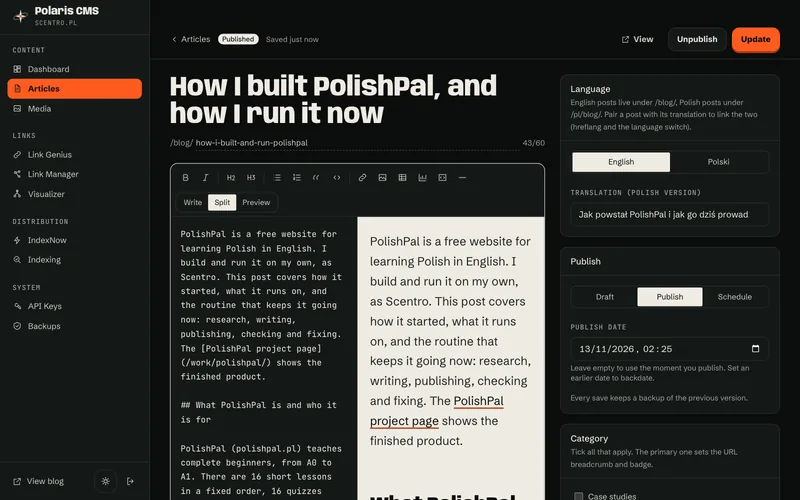
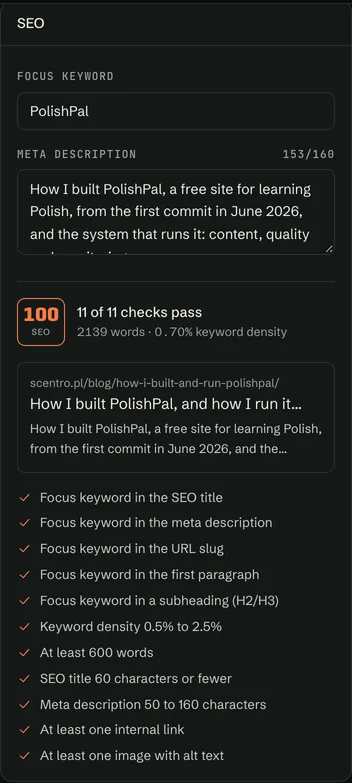
Markdown with write, split and preview views; the preview uses the site's own renderer and stylesheet. Tables, footnotes, highlighted code, figures with captions, and chart blocks drawn as SVG with their numbers in a data table. Eleven checks run as you type, and the score is the share that pass:
- Focus keyword in the SEO title
- Focus keyword in the meta description
- Focus keyword in the URL slug
- Focus keyword in the first paragraph
- Focus keyword in a subheading (H2 or H3)
- Keyword density from 0.5% to 2.5%
- At least 600 words
- SEO title of 60 characters or fewer
- Meta description of 50 to 160 characters
- At least one internal link
- At least one image with alt text
-
Scheduling without a cron job
A post is a draft, scheduled or published. A scheduled post goes live at its time on its own: public pages treat a due post as live, and a housekeeping tick then flips its status and pings IndexNow.
-
Two languages, paired
Every post has a language. Its translation is picked in the editor, or sent through the API as translationOf, and hreflang links the two only once both are live.
-
Media in the database
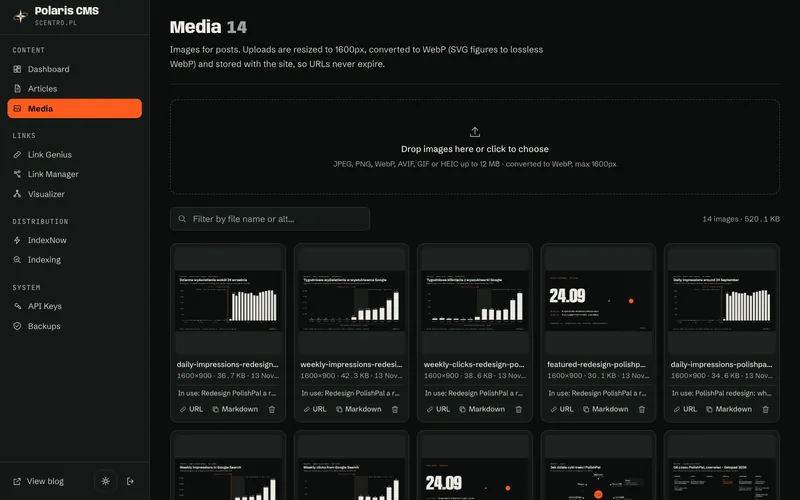
Uploads are converted to WebP, at most 1600 px wide (an SVG becomes a lossless WebP), and stored in PostgreSQL. They are served from /media/ with immutable caching, so there is no separate file storage to run.
-
Link tools
Link Genius suggests internal links in the post's language while you write. A link manager, a graph of pillars and clusters, and an audit of orphan pages and broken links show the whole site at once.
-
SEO plumbing
RSS per language, a live sitemap, generated share images, JSON-LD, IndexNow pings on publish, and Google Search Console URL inspection from the admin when a service account is set.
-
Backups and restore
Every save and every delete keeps a snapshot of the previous version, a full backup is taken daily, and any snapshot can be downloaded as JSON or restored in place.
-
An API for AI agents
Keys are created in the admin, stored only as a hash, and a key can't create or revoke keys. Agents list, read, save, schedule and delete posts and upload images, and what they write gets the same SEO score as a person's post. Actions: list, list-all, get, save, set-status, delete, recompute-scores, plus POST /api/cms/upload for images.
POST /api/cms/posts Authorization: Bearer $KEY { "action": "save", "post": { "lang": "en", "title": "…", "content": "## …", "status": "scheduled", "publishedAt": "2026-12-01T08:00:00Z" } } -
Secure under a strict CSP
Sign-in with rate limiting and a signed session cookie. The admin runs under a Content Security Policy with no inline scripts or styles, this site's included, and drafts are never public.
-
A plain stack
Astro or Next.js, React 19 for the admin, Drizzle ORM and PostgreSQL 16 or newer. Migrations run when the app starts, and it runs wherever Node runs, in Docker or not. The starter kits add optional modules: comments with moderation and ad slots.
Inside the admin
Screens from this site's own admin, with the real posts from this blog.
Coming with v1
Install
The public release will install like any npm package. These commands are planned for v1 and don't work yet; until then I set up Polaris CMS myself as part of a website project.
-
A new site
An Astro or Next.js starter with Polaris CMS built in.
npm create polaris-cms@latest my-site -
An existing Astro site
One integration adds /studio, the API routes and the database migrations.
npm install polaris-cms # astro.config integrations: [polaris()] -
An existing Next.js site
Install the package and add one route file that re-exports its handlers.
npm install polaris-cms
Coming with v1 Updates with npm update. It needs PostgreSQL, runs anywhere Node runs, and a Docker recipe will be included.
Want Polaris CMS on your site?
The docs and release notes will live on the project site. If you need it before the public release, write to me: I set it up as part of a website or a blog.